AI Reverse Image Search: The Complete Guide (2026)

Two search methods share the name "reverse image search", and confusing them wastes hours. Pixel-based engines — Google Images, Yandex, Bing, TinEye — find copies of an image. AI face search matches the person inside the image across completely different photos. A professional workflow uses both, in the right order, for the right questions.
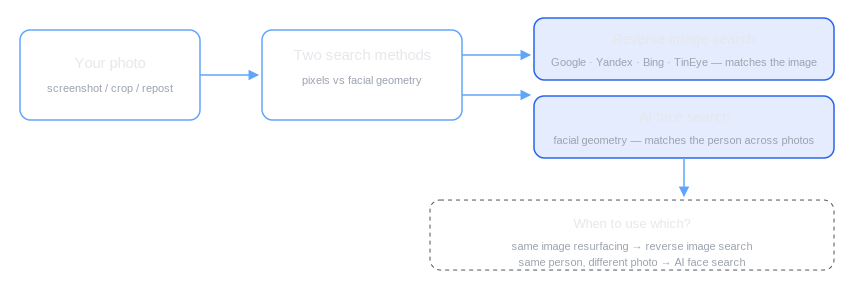
Method 1: Pixel-based reverse image search
These engines compute a fingerprint of the image itself — colors, edges, composition — and look for pages containing that same fingerprint. Use them when the exact image (or a resized crop of it) may have been published somewhere: a stolen profile picture, a scammer's reused photo, a product image you want traced.
- Google Images — largest general index. Strongest for web pages that embed the image.
- Yandex — frequently the best at visually similar matches and at faces in casual photos. Covers regions and platforms others index shallowly.
- Bing — object and product recognition; sometimes surfaces pages Google misses.
- TinEye — smallest index, but excellent at answering "where did this image first appear and where is it used now".
The fastest way to run all four is a multi-engine tool like our free reverse image search, which fires the same image at every engine at once.
Method 2: AI face search
Face search ignores backgrounds, filters and crops. It extracts the geometry of the face — the distances and angles that stay stable across photos — converts it to a mathematical embedding, and ranks indexed images by similarity. Use it when the person appears in different photos across platforms: an avatar here, a tagged photo there, a video frame somewhere else.
What it can find: public profile pictures, public posts, indexed thumbnails. What it can never find: private accounts, deleted content, photos that were never published. Anyone promising otherwise is selling fiction.
Find Anyone Online — AI Results in 60 Seconds
Upload a photo to see where that face appears across the web. Free to start.
Start AI Face Search →A professional workflow, step by step
1. Prepare the image
Use the largest, least-cropped version you have. Screenshot? Crop to the face. Multiple faces? Crop each one separately — engines match one face per query well.
2. Pixel pass
Run every reverse image engine. Tag each result: same image found on which site, first seen when. Dead ends here are still data — they prove the image itself is not widely published.
3. Face pass
Run face search on the cropped face. Expect ranked candidates with similarity scores. Scores are a sorting tool, not proof — always open the source and compare context.
4. Pivot on what you find
A found profile gives you new material: usernames, other photos, linked accounts. Pivots compound. Three weak leads joined correctly often identify someone that no single search would. Platform specifics matter — see our guides for Reddit, TikTok, YouTube, Snapchat, Facebook and Telegram.
5. Document everything
Screenshots with timestamps, URLs, scores. If a source deletes later, your documentation is the only evidence left.
Accuracy: the honest version
Face search quality depends on three things nobody can cheat: the quality of your input photo, whether the person's face is actually published publicly, and the index coverage at search time. A high score on a clear front-facing match is strong evidence. A low score proves nothing in either direction. Any tool claiming to "find anyone instantly" is describing a database, not a search.
Legality and ethics
Searching publicly indexed images for verification, research and safety is legal in most jurisdictions. It is not an FCRA-compliant background check, and it must not be used for decisions about employment, tenancy, credit or insurance — or for harassment. Verify sources yourself before acting on any match.
FAQ
Is AI reverse image search free?
Pixel engines are free. AI face search costs credits because it runs dedicated facial-recognition infrastructure — see the pricing page for one-time packs, no subscription.
Which engine finds social media profiles?
Pixel engines find pages containing the same image. For different photos of the same person, face search is the method that works.
Can I search a photo of someone who has no social media?
If their face was never published publicly anywhere, no tool can find it. Search can only surface what exists.
Written by FaceHunterAI Team
The FaceHunterAI Team consists of industry experts in digital privacy, open-source intelligence (OSINT), and cybersecurity. We are dedicated to providing actionable insights to help protect your digital identity.
Related Investigations
Face Search Accuracy: What AI Can and Cannot Guarantee
Face search scores are a sorting tool, not a verdict. What actually drives accuracy, what a high score proves, and the four cases where any face search will fail.
How OSINT Analysts Search an Image: A Professional Workflow
Hash it, run the engines, pivot on usernames, document everything. The image-search workflow OSINT professionals actually follow — and the mistakes that burn amateurs.